
Fotografiere deinen Teller, sieh deine Kohlenhydrate.
openplate ist ein Open-Source-Kalorienzähler und Ernährungstagebuch für dein Smartphone und deinen Computer. Wähle die Variante, die zu dir passt.
App nutzen
Einfach erfassen, was du isst
Trage deine Mahlzeiten ein, oder nimm ein Tellerfoto auf, um eine Schätzung der Kohlenhydrate zu erhalten. Es läuft in deinem Webbrowser ohne Installation, und wir betreiben den Server für dich.
Registriere dich ohne Einladung auf der gehosteten Instanz unter app.openplate.de, oder betreibe deine eigene Instanz kostenlos.
Das Tagebuch wird vor dem Hochladen auf deinem Gerät verschlüsselt. Wir betreiben den Server, daher besitzen wir den Backup-Schlüssel für Passwort-Resets. Mit diesem Backup-Schlüssel können wir dein Tagebuch lesen.
Selbst betreiben
Eigene Instanz betreiben
Self-Hosting bedeutet, dass openplate kostenlos auf deinem eigenen Computer oder Server statt auf unserem läuft. openplate ist Open-Source-Software: Der Code ist öffentlich, sodass ihn jeder lesen und überprüfen kann.
Foto-Scans funktionieren ohne die Cloud. openplate-inference führt Open-Weight-KI-Modelle auf deiner eigenen Hardware aus, mit oder ohne Grafikkarte. Die Fotos verlassen dein Netzwerk nie.
Bei einer eigenen Instanz gehört dieser Backup-Schlüssel dir.
Diese Ansichten zeigen Beispieldaten, kein echtes Tagebuch.
Warum es openplate gibt
Die meisten Ernährungstracker speichern dein Tagebuch auf ihren Servern, wo du keine Kontrolle darüber hast. openplate speichert es primär auf deinem Gerät. Der Quellcode ist öffentlich, sodass ihn jeder prüfen kann. Unsere gehostete App speichert zusätzlich eine verschlüsselte Kopie auf unseren Servern, und unser Backup-Schlüssel kann sie lesen. Bei deiner eigenen Instanz ist jeder Dienst optional, einschließlich Synchronisierung und Fotoscan, und du kannst jeden Teil selbst hosten.
Kein zwischengeschalteter App-Store
openplate ist eine Web-App (eine PWA), die du direkt aus dem Browser installierst, auf dem Smartphone oder dem Computer. Es gibt keinen App-Store. Niemand benötigt ein Apple- oder Google-Konto, und kein Prüfprozess oder Gebührenmodell steht zwischen einem Release und deinem Gerät. Eine Institution, die openplate hostet, stellt die App unter ihrer eigenen Domain bereit, und ein Update erreicht jedes Gerät beim nächsten Öffnen der App.
Was openplate ist
Alles, was einem Nutzer gehört (Ernährungsprotokolle, Gewichte, eigene Lebensmittel, Ziele, die KI-Einstellungen), wird im IndexedDB des Browsers auf dem Gerät gespeichert, auf dem es eingegeben wurde (app/lib/local-store/). Es liegt dort im Klartext, weil es dein Gerät ist, und verlässt es nie, außer in zwei von dir gewählten Formen: als JSON-Export, den du herunterlädst, oder als verschlüsselter Sync-Blob.
Der App-Server ist ein einzelner zustandsloser Container. Keine Datenbank, kein ORM, keine Migrationen und kein Secret, das er zum Starten benötigt. Er kann genau ein optionales Secret enthalten, den Schlüssel des Betreibers für die Lebensmitteldatenbank, wie unten beschrieben. Das Löschen des Containers führt zu keinem Datenverlust. Das ist keine Sparsamkeit, es ist das gesamte Versprechen: siehe ADR-0006.
Was du mit openplate tun kannst
Diese Ansichten zeigen Beispieldaten, kein echtes Tagebuch.
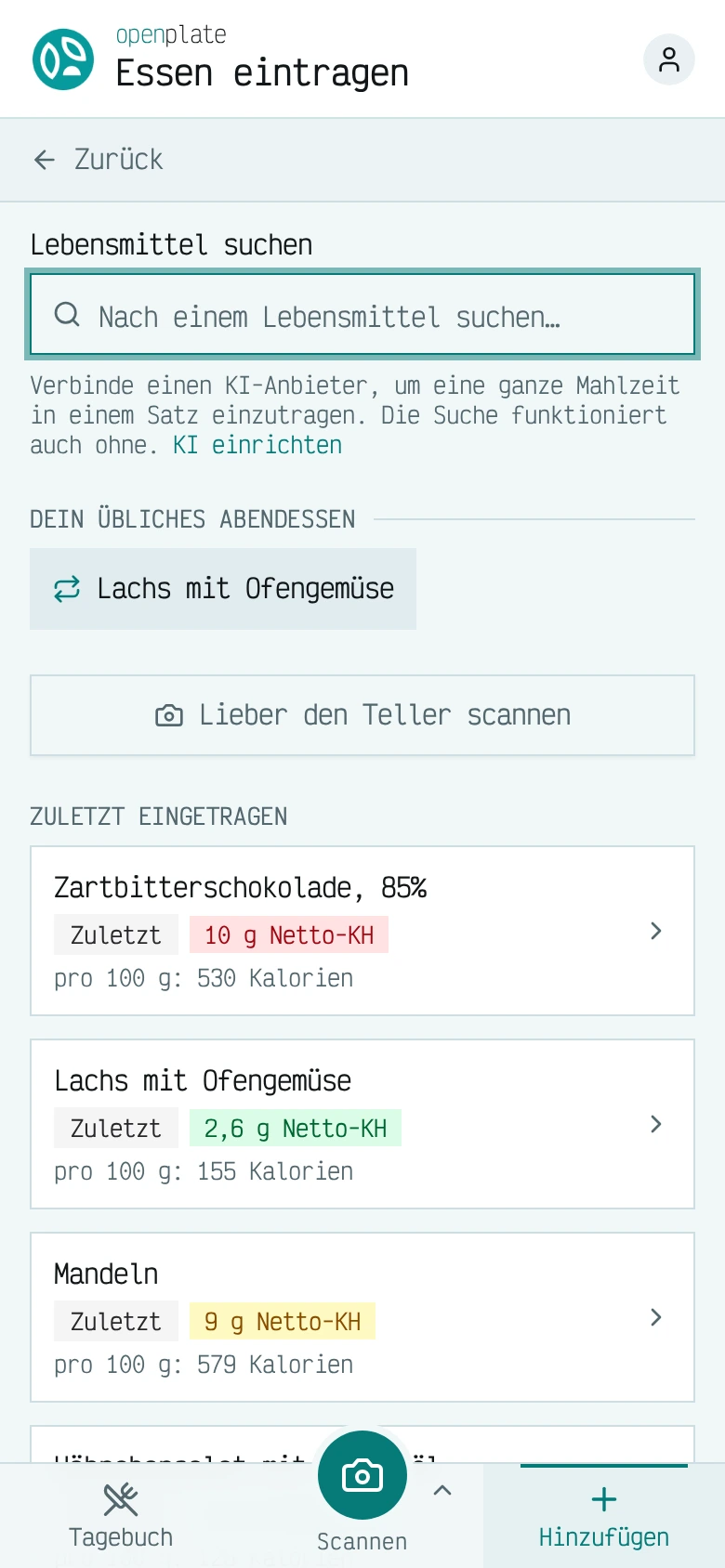
Essen eintragen
Durchsuche die Lebensmitteldatenbank oder wähle etwas aus, das du zuvor eingetragen hast, und der Eintrag landet beim gewählten Tag unter der jeweiligen Mahlzeit.
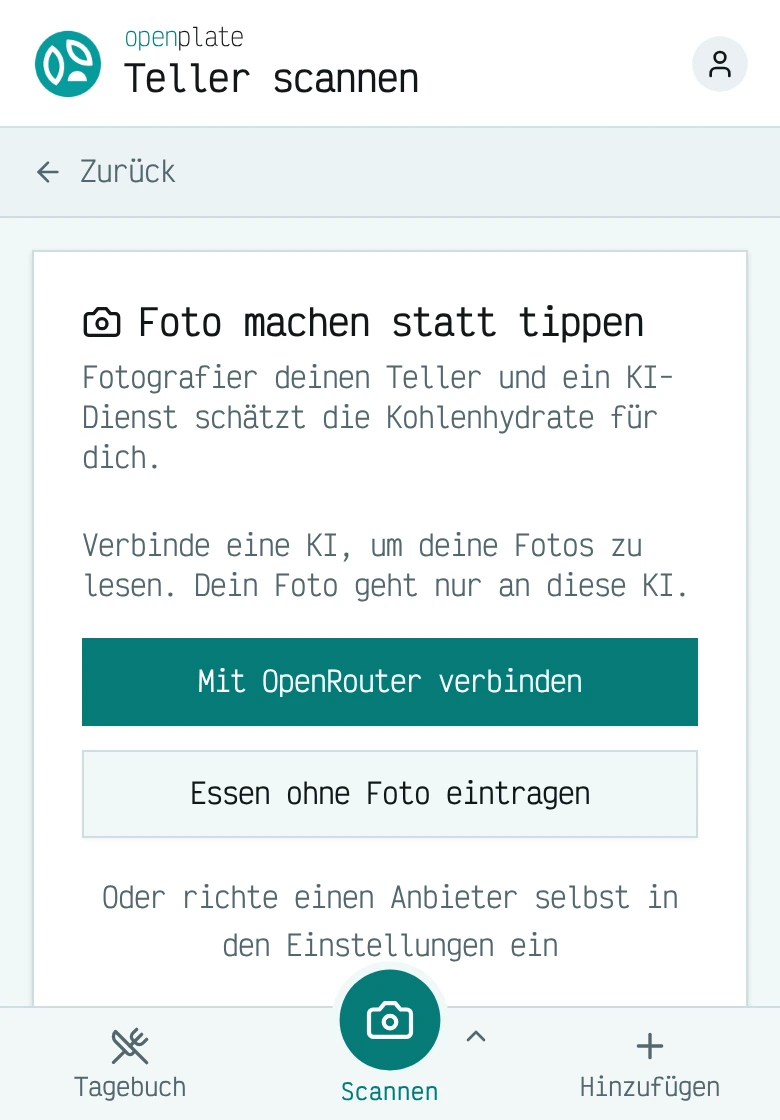
Teller scannen
Fotografiere deinen Teller und ein KI-Modell schätzt die Kohlenhydrate. In der gehosteten App leitet unser Server das Foto an den KI-Anbieter weiter und speichert es nicht. Bei deiner eigenen Instanz geht es nur an den KI-Dienst, den du anbindest.
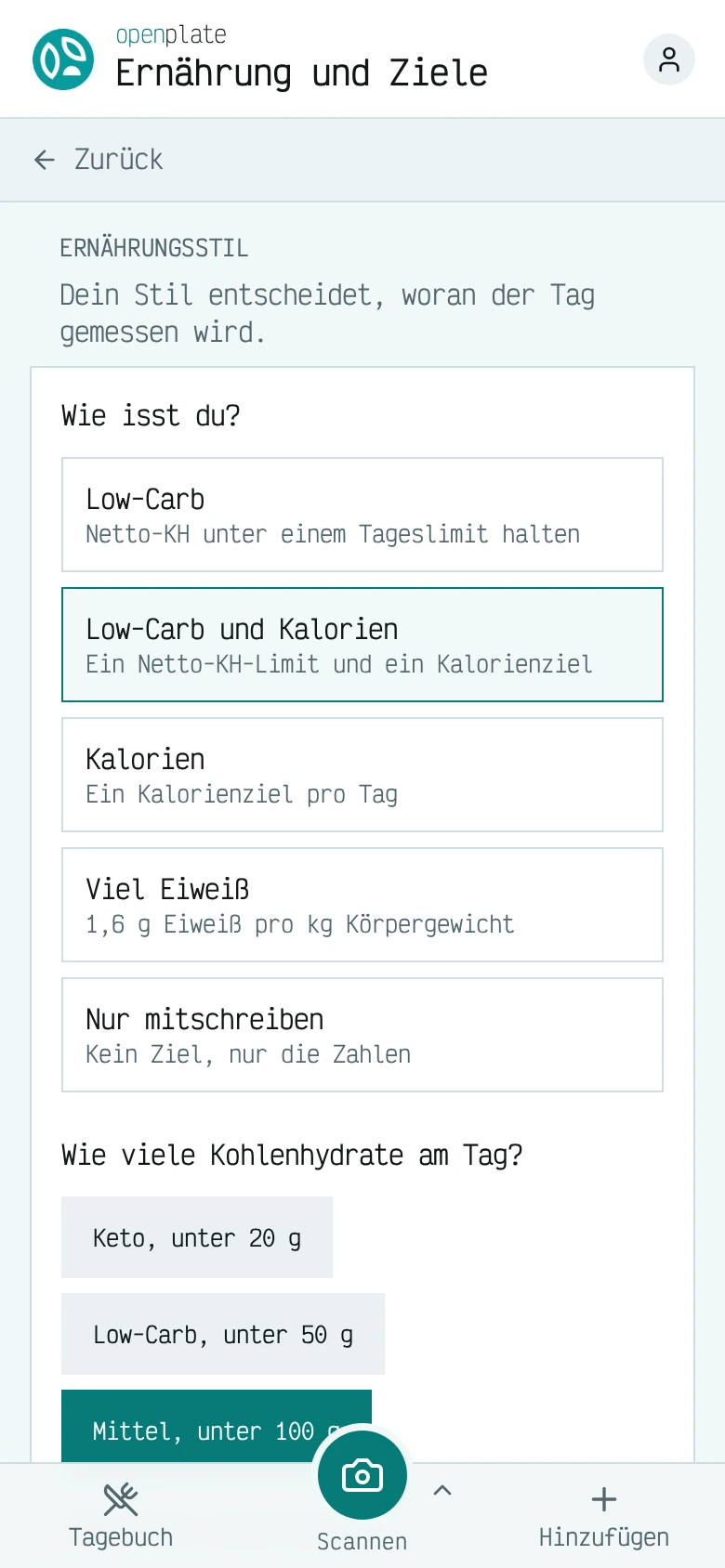
Wähle deine Ernährungsweise
Low-Carb, Kalorien, viel Protein oder einfaches Erfassen. Der gewählte Stil legt fest, welches Ziel den Tag bewertet, und jedes Ziel ist optional.
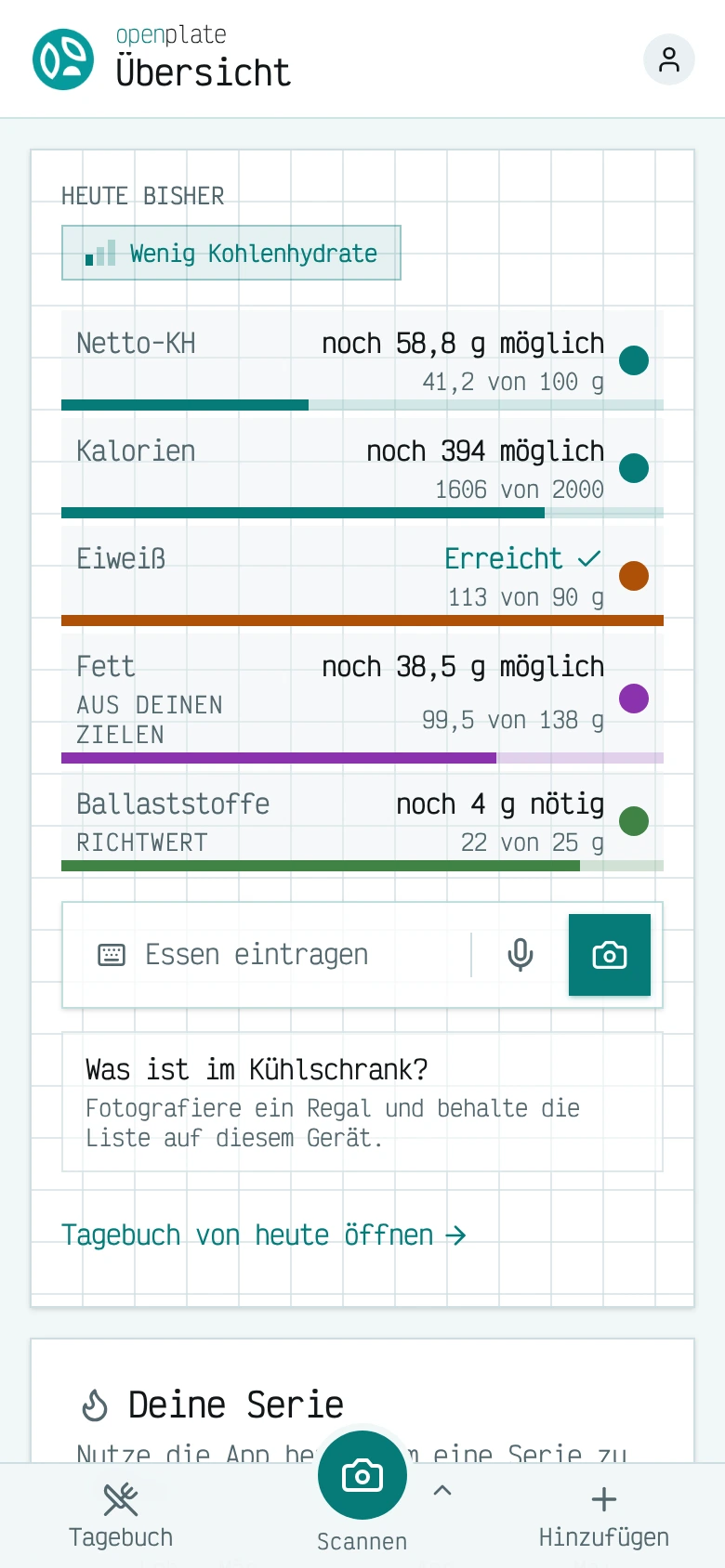
Den Stand des Tages sehen
Netto-Kohlenhydrate, Kalorien, Protein, Fett und Ballaststoffe für den Tag, jeweils im Vergleich zum Zielwert dargestellt, und die Anzahl der letzten sieben Tage, an denen du Einträge erfasst hast.


Wohin deine Daten fließen
Drei Programme, ein Produkt und zwei optionale Anhänge, plus ein externer Dienst, der Lebensmittelnamen beantwortet. Diese Seite erklärt, was jedes davon speichert und welches davon im Pfad deiner Daten steht.
Die Zeichnung unten zeigt das gesamte System in fünf Pfeilen. Dein Gerät speichert das Tagebuch und das Tellerfoto. Das Tagebuch verlässt das Gerät verschlüsselt in Richtung openplate-core. Das Foto geht an den KI-Endpunkt, den du konfiguriert hast. Der App-Server liefert die Seite aus und leitet die Namen der nachgeschlagenen Lebensmittel an eine Lebensmitteldatenbank weiter. Er steht weder im Tagebuchpfad noch im Fotopfad.
Drei Dinge passen hinter „dein KI-Endpunkt“: ein Cloud-Anbieter, bei dem du einen Schlüssel hast, ein openplate-inference-Rechner auf eigener Hardware oder, bei einer gemanagten Instanz, der Core-Server selbst, der das Foto weiterleitet und von deinem Kontingent abzieht. topologies.md zeigt alle vier Möglichkeiten, openplate zu betreiben, jeweils als kleine Grafik.
Du trägst ein Lebensmittel ein
Sein Name wird über den App-Server an die Lebensmitteldatenbank übertragen.
Du scannst einen Teller
Das Foto geht an deinen KI-Endpunkt. In der gehosteten App ist das unser Server, der es an einen KI-Anbieter weiterleitet, ohne es zu speichern.
Wenn die Synchronisierung aktiv ist
Es verlässt das Gerät verschlüsselt und geht an openplate-core. Ein Konto in der gehosteten App synchronisiert, und unser Backup-Schlüssel kann diese Kopie lesen.
Alles andere bleibt
Dein Tagebuch bleibt auf dem Gerät. Bei deiner eigenen Instanz mit deaktivierter Synchronisierung hat kein Server eine Kopie.
Drei Komponenten, beim Self-Hosting jenseits der App optional
Die App funktioniert für die Tagebuchführung eigenständig. Der Core-Server und die Inferenz-Runtime ergänzen Funktionen. Beide sind separate Programme. Bei deiner eigenen Kopie kannst du sie selbst betreiben oder ganz weglassen. Die gehostete App synchronisiert immer über den Core-Server.
App
Ein quelloffener, selbst gehosteter Food-Tracker mit BYOK-Tellererkennung per KI (Bring Your Own Key). Mach ein Tellerfoto. Dein eigener KI-Anbieter (OpenRouter, Mistral, jeder OpenAI-kompatible Endpunkt oder Anthropic) schätzt die Makronährstoffe. Auf einer Instanz, die du selbst betreibst, sind es dein Schlüssel, dein Anbieter und deine Daten. Eine gehostete Instanz mit Konten unterscheidet sich in zwei Punkten: Der Betreiber stellt die KI bereit, und der Betreiber behält einen Wiederherstellungsschlüssel, der dein Tagebuch öffnen kann (docs/sync.md).
Core-Server
Der Account-Dienst für openplate. Seine erste Funktion ist der verschlüsselte Sync zwischen deinen Geräten: Das Tagebuch wird auf jedem Gerät verschlüsselt, bevor es hochgeladen wird, und der Betreiber behält eine versiegelte Kopie jedes Wiederherstellungscodes, sodass der Betreiber ein vergessenes Passwort zurücksetzen und auch das Tagebuch lesen kann.
Inferenz-Runtime
Ein Scanner für Tellerfotos, den du selbst betreibst. Richte dein Smartphone auf das Abendessen und erhalte eine Liste von Lebensmitteln mit Portionsschätzungen in Gramm zurück, berechnet auf deiner Hardware, durch Open-Weight-Modelle, ohne Konto, ohne API-Key von irgendwem und ohne dass ein Foto dein Netzwerk verlässt.
Auf deiner eigenen Instanz wählst du die KI
Sende Tellerfotos an einen Rechner, den du kontrollierst, an einen Anbieter mit persönlichem Schlüssel oder über einen gemeinsamen Haushaltsserver.
Die gehostete App unter app.openplate.de enthält KI-Zugriff im Tarif und benötigt keinen Schlüssel.
Auf eigener Hardware
openplate-inference führt Open-Weight-Modelle wie Qwen3-VL auf einem Rechner aus, den du kontrollierst. Die App bindet auch Ollama, vLLM, LM Studio oder llama.cpp als OpenAI-kompatiblen Endpunkt an.
Mit eigenem Schlüssel
In den KI-Einstellungen der App bindest du OpenRouter mit einem Klick an oder trägst einen Schlüssel für Anthropic, Mistral oder einen beliebigen OpenAI-kompatiblen Endpunkt ein. OpenRouter erreicht auch Modelle von Google, OpenAI, Qwen, DeepSeek und Kimi. Dein Schlüssel bleibt in deinem Browser und geht nur an den Anbieter.
Auf einem Familienserver
Wer openplate-core betreibt, hinterlegt einen Anbieter-Schlüssel auf dem Server. Alle eingeladenen Personen nutzen diesen Schlüssel, bleiben innerhalb des vom Server festgelegten Kontingents und sehen den Schlüssel selbst nie.
Die Namen und Logos gehören ihren jeweiligen Eigentümern. Kein Anbieter befürwortet oder sponsert openplate.
Wer welche Daten hält
| Komponente | Was gespeichert wird | Was bei der Übertragung sichtbar ist |
|---|---|---|
| Dein Browser | Das gesamte Tagebuch, im Klartext, in IndexedDB. Dein KI-Schlüssel. Zwischengespeicherte Tellerfotos. | Alles. Es ist dein Gerät. |
| openplate-App-Server | Keine Datenbank, keine Konten, kein Tagebuch. Höchstens ein Geheimnis: der Schlüssel des Betreibers für die Lebensmitteldatenbank. | Seitenabrufe und die Namen der Lebensmittel, die du nachschlägst oder scannst, welche an die Lebensmitteldatenbank weitergeleitet werden. Niemals ein Foto, niemals dein KI-Schlüssel, niemals ein Tagebucheintrag, niemals ein Sync-Blob. |
| openplate-core (optional) | Eine E-Mail-Adresse, ein Authentifizierungs-Verifier, KDF-Parameter, das Tagebuch als Geheimtext und der hinterlegte Wiederherstellungscode, der ihn entschlüsseln kann. Auf einer verwalteten Instanz außerdem das Kontingent jedes Kontos (pro Tag oder pro Woche) und der Nutzungszähler. Bei aktivierten obigen Funktionen zusätzlich das, was jede davon auflistet. | Blob-Größe, Schreibzeitpunkte, Sitzungs-Metadaten. Auf einer verwalteten Instanz außerdem das an den KI-Proxy weitergeleitete Foto für die Dauer der Weiterleitung, einmal gelesen, nicht gespeichert. |
| openplate-inference (optional) | Nichts pro Nutzer: keine Konten, keine Sitzungen, keine Cookies. Nur Modellgewichte und ein Lebensmitteldatensatz. | Das Foto, das du gesendet hast, für die Dauer der Anfrage. Mit der Standard-Lebensmittelquelle erfolgt außer dem einmaligen Download der Gewichte kein ausgehender Aufruf. Mit FOOD_SOURCE=lcc oder off werden Lebensmittelnamen nach außen gesendet, niemals das Foto. |
| LowCarbCheck-Lebensmitteldatenbank (aktiv, sofern nicht deaktiviert) | Ein Nutzungszähler pro Schlüssel oder pro Netzwerkadresse für Aufrufer ohne Schlüssel. | Lebensmittelnamen und eine Sprache vom App-Server mit dem Schlüssel der Instanz. Niemals ein Foto und niemals deine Identität. |
| Cloud-KI-Anbieter (BYOK-Pfad) | Was auch immer deren Richtlinie besagt. | Das Foto und dein Schlüssel. Es gelten deren Bedingungen, nicht unsere. |
Forschungspartner
Wir suchen Universitäten, Ernährungsforscher und klinische Teams, die mit openplate arbeiten möchten. Ein Tagebuch, das auf dem Gerät der teilnehmenden Person gespeichert wird, Code, den eine Ethikkommission prüfen kann, und Forschungsanalysen, die nur mit Einwilligung aufzeichnen, machen openplate zu einer praktischen Basis für Ernährungsstudien.
Was wir messen
openplate zeichnet nichts auf, bis ein Betreiber das Tracking aktiviert. Die gehostete Instanz auf openplate.de zählt Seitenaufrufe und welche Funktionen genutzt werden. Sie erfährt nie, was du isst, wiegst oder einträgst. Wer eine eigene Kopie betreibt, wählt eine von drei Stufen, von reinen Seitenaufrufen bis hin zu einer Forschungsstufe, die das Gesundheitsverhalten für eine Studie mit einwilligenden Teilnehmenden erfasst. Es sind keine Drittanbieter zwischengeschaltet. Die Zahlen landen in einer selbst betriebenen Matomo-Instanz, bei komplett deaktivierten Cookies. Die Konfiguration listet jedes Ereignis auf jeder Stufe auf.
Zugang erhalten
Jeder kann sich mit einer E-Mail-Adresse auf der gehosteten Instanz unter app.openplate.de registrieren. Es ist keine Einladung nötig. Die gehostete App erfordert einen kostenpflichtigen Tarif. Der Betrieb einer eigenen Kopie kostet nichts. Siehe Self-Hosting.
Gesundheitsrechner
Berechne deinen BMI und deinen täglichen Bedarf an Energie, Protein und Wasser aus wenigen Werten.
Open Source
openplate und openplate-core nutzen die MIT-Lizenz. openplate-inference hat eigene Bedingungen, die durch die mitgelieferten Modellgewichte bestimmt werden. Der Lizenzleitfaden führt sie auf. Alle drei befinden sich in einem Repository, github.com/LowCarbCheck/openplate. Lies den Code, ändere ihn und betreibe ihn selbst. Die beiden Dienste haben dort eigene Ordner, openplate-core und openplate-inference.